
Know the factory cable limits first
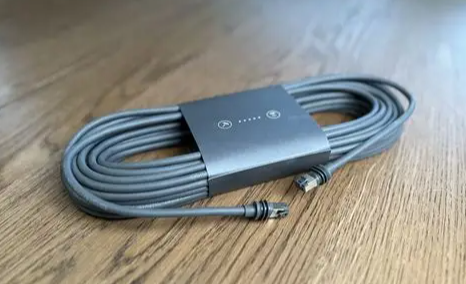
Starlink dishes ship with a fixed-length cable and proprietary connectors you cannot field-terminate without voiding the warranty. The Gen2/Standard cable runs up to 25 m (75 ft) from dish to power supply; the Gen3 (Standard) and Performance kits allow up to 50 m (150 ft) dish-to-power-supply, and the total run from dish to your network gear can reach 100 m (300 ft) through the power supply. Plan the route before you buy anything so you do not exceed these limits.
Extending the cable the right way
Because the original connector is sealed, "extending" means joining two cables with a coupler rather than cutting and splicing. Use a weatherproof RJ45 coupler or, better for outdoor runs, an IP67 bulkhead coupler that sits at a wall or roof penetration. Keep the factory dish cable intact end-to-end; only couple at a protected, dry-ish junction. Every joint is a failure point, so minimize them.
For permanent outdoor joins, prefer a shielded, IP67-rated inline coupler with a covered junction box over a bare RJ45 join, because UV and moisture are what kill field connections first. If the run crosses from outside to a structured-cabling closet, terminate the Starlink side at a keystone jack inside a weatherproof box and run certified Cat6 from there — that keeps the proprietary connector intact while giving you a standard, testable link.
Waterproof connectors and the drip loop
Where the cable passes from outside to inside, use an IP68 cable gland or bulkhead passthrough. Form a drip loop — a downward U just inside the entry — so any water running along the jacket drips off before reaching the seal. Mount the gland on a vertical or under-hang surface, never on a flat deck, and bed it in marine sealant. Cap the passthrough when the dish is removed.
Routing through walls and roofs
- Walls: drill a slightly downward-angled hole, pass the cable, then seal with expandable foam and exterior sealant. Keep the bend radius at 5 cm (2 in) or larger.
- Roofs: use a roof boot or deck gland; on flat roofs route the cable over the parapet through a gland to avoid a penetration entirely.
- Conduit: for long exposed runs, run the cable in UV-resistant conduit and secure it every 30–50 cm to stop wind chafe.
Cable length limits and signal loss
For the Starlink side, the hard limits above are the rule. For any Ethernet you add between the power supply and your router, remember standard PoE and Cat5e/6 channels top out at 100 m (328 ft) end to end per IEEE 802.3 and TIA-568. Beyond that, signal attenuation and voltage drop make links unreliable; use a mid-span switch, a PoE extender, or fiber with a remote converter. Higher-power PoE (802.3at/bt) loses usable distance under full load, so size the run conservatively.
| Segment | Max length | Source of limit |
|---|---|---|
| Dish to power supply | 25 m (Gen2) / 50 m (Gen3) | Starlink kit spec |
| Dish to network gear (total) | 100 m | Starlink kit spec |
| Added Ethernet / PoE run | 100 m | IEEE 802.3 / TIA-568 |
Couplers vs crimping
Couplers keep the factory connector intact and are reversible and field-friendly — best for most users. Crimping a new end onto Starlink cable is not supported (proprietary connector, warranty void) and should only be attempted by specialists who fit a replacement cable assembly. For your own Cat5e/6 extensions, a proper pass-through crimp with certified plugs beats a cheap coupler for signal integrity, but adds a termination you must weatherproof. In practice: couple the Starlink side, crimp only your standard Ethernet side.
Check the run before you buy
Before ordering couplers or drilling, mock up the path with a tape measure and the Starlink app's obstruction tool at both ends. Note every bend, every penetration and the exact distance from dish to where the power supply will sit. If the real run exceeds Starlink's dish-to-supply limit, you need a different mounting spot, not a longer cable. If your added Ethernet between supply and router exceeds 100 m, plan a mid-span switch or fiber now rather than discovering it after the trench is closed. This check takes ten minutes and prevents the most common rework.
Pulling it together
Map the full path dish → power supply → router before ordering. Keep Starlink's own cable intact and within spec, add standard Ethernet with good Cat6 and sealed couplers where needed, and seal every penetration with a drip loop. Need the matching gland and passthrough? See our accessory catalog, and compare terminal fit in our Mini vs Standard guide. For portable builds see portable solutions, and review our marine installation guide for sealed entry examples.
Data references
Starlink cable lengths and bend radius: Starlink Help Centre – install on boats (cable limits apply to all kits) and Starlink Maritime / Mobility Install Guide (Gen3 limits). Ethernet/PoE distance: PoE maximum distance explained.
Frequently Asked Questions
Can I cut and splice the Starlink cable to extend it?
Not recommended — the connectors are proprietary and cutting voids the warranty. Extend by coupling the factory cable to a standard Ethernet run with a weatherproof coupler instead.
How long can the Starlink cable be?
Up to 25 m (Gen2) or 50 m (Gen3) from dish to power supply, and up to 100 m total to your network gear. Any added Ethernet must also respect the 100 m PoE/Ethernet limit.
What is a drip loop and why use one?
A downward U-bend just inside a cable entry that makes water run off the jacket instead of tracking inside. Always pair it with a sealed gland.
Coupler or crimp for my extension?
Couple the Starlink side to keep the factory connector intact; crimp only your own standard Cat5e/6 with certified plugs, and weatherproof that joint.
Starlink is a trademark of SpaceX. PLZTECH supplies independent accessories compatible with Starlink terminals and is not affiliated with or endorsed by SpaceX.